Select Version of EA Desktop:
Project Tracker accommodates workflows for adding new seismic or adding existing seismic to a project. The Add Existing option provides search functionality to locate the existing seismic.
To add existing seismic to a project:
-
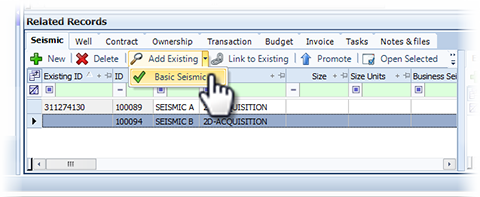
In the Related Records section, click the down-arrow of Add Existing and select a search.
-
When the search window opens, enter your search criteria and click Search. The results open in the Select Item window.
-
Select the seismic to add to the project and click OK.
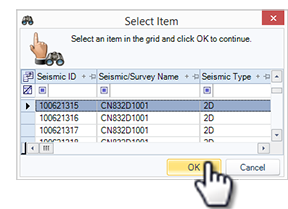
The Select Item window closes and the selected seismic adds to the Seismic tab of the Related Records.
-
Click Save.
Project Tracker accommodates workflows for adding new seismic or adding existing seismic to a project. The Add Existing option provides search functionality to locate the existing seismic.
To add existing seismic to a project:
-
In the Related Records section, click the down-arrow of Add Existing and select a search.
-
When the search window opens, enter your search criteria and click Search. The results open in the Select Item window.
-
Select the seismic to add to the project and click OK.
The Select Item window closes and the selected seismic adds to the Seismic tab of the Related Records.
-
Click Save.